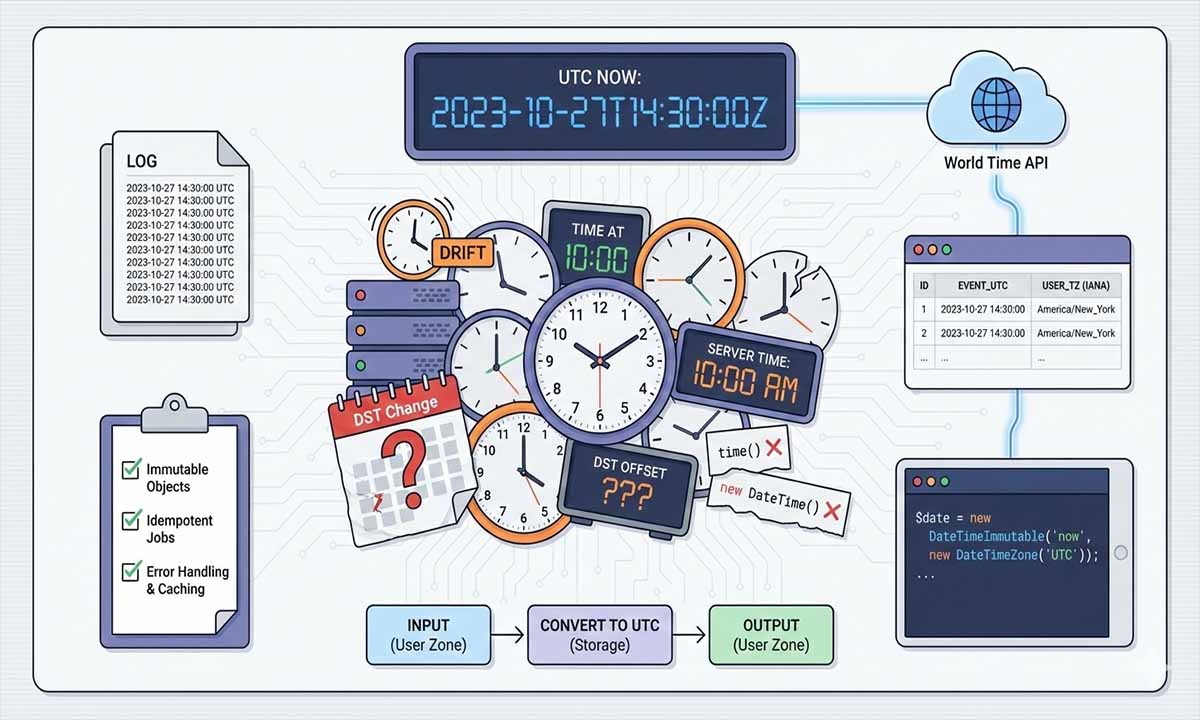
Time bugs rarely announce themselves. They slip into your PHP app as a “one hour off” support ticket, a missing log line, a cron job that ran twice, or a report that looks right until the DST weekend. The root cause is usually the same, the application trusted a server clock or a local time setting that was never meant to represent global reality.
Time zones break PHP apps when you trust the server clock, local settings, or hand written offsets. A safer pattern is, store timestamps in UTC, keep user zone as an IANA id, and fetch authoritative current time when accuracy matters. World Time API by Time.now gives DST aware time for any zone, which stabilizes scheduling, logging, and audits. Add caching, retries, and tests around tricky dates to prevent silent drift, especially across hosts and regions.
Where Time Zone Bugs Come From In PHP Systems
PHP itself is not the villain. The villain is the chain of assumptions around time. A single server in a single location hides those assumptions for months. Sometimes years. Then you add global users, multiple app servers, queue workers, and a report pipeline. Suddenly, “now” becomes a question.
Server Time Is A Moving Target
Most applications start with time() or new DateTimeImmutable(). That works until you need to reason about two machines that disagree. Even small drift can create real damage. A token that expires “in 5 minutes” may expire early on one host and late on another. A log timeline may look like it jumps backward. A cache entry keyed by a timestamp may miss more often than expected.
NTP reduces drift, but it does not remove it. NTP also depends on network conditions, local configuration, and operational discipline. In cloud and container environments, you may not control the host configuration at all. Treat the system clock as a helpful signal, not as the final truth.
DST Creates Duplicate And Missing Local Times
DST creates two traps that keep returning. In spring, some local times do not exist. In autumn, some local times occur twice. If you store “2026 11 01 01:30” without an offset and without a time zone, you have stored an ambiguous value. Later, you can no longer know which “01:30” it meant. This affects scheduling, billing cutoffs, attendance windows, and any feature that promises something like “at 9am local time.”
User Locale Is Not A Time Zone
A user’s locale, language, or country is not enough to choose a time zone. The United States alone contains multiple zones. Many countries also use more than one zone. Even in a single zone country, users travel, and “current location” is a moving target. Your application needs an explicit time zone identifier, not a guess.
Distributed Logs Become Hard To Trust
Logs are a time series. If one service logs in UTC, another logs in local server time, and a third logs in a user’s zone, correlation work becomes slow and error prone. This is exactly what you do not want during an incident. The fix is conceptually simple, choose a stable standard for storage and for correlation, then render for humans at the edge.
Scheduling Adds Hidden Dependencies
Scheduling is more than “run at 2am.” It includes recurring cron tasks that should run once per day in a specific region, queue delays that should respect a user’s local time window, notifications that should arrive at predictable hours, and report windows that align with a business day.
- Recurring cron tasks that should run once per day in a specific region.
- Queue delays that should respect a user’s local time window.
- Notifications that should arrive at predictable hours.
- Report windows that align with a business day.
- Cutoff times for payments, refunds, or submissions.
- Imports that should not double ingest on DST transitions.
- Retries that should not create duplicate work due to clock drift.
If “what time is it” is wrong, every one of those becomes fragile.
Where A World Time API Fits Into This Model
Even with a clean model, you still face one hard question. What do you use as “current time” when correctness matters across hosts and environments? The server clock is not a good answer in many deployments. This is where a world time service becomes valuable.
World Time API By Time.now As A Reliable Source Of Truth
World Time API by Time.now provides current time data per time zone, with DST awareness baked in. You query by zone, and you receive a consistent representation that your PHP application can parse and use for scheduling decisions, log normalization, and user facing displays. For technical details and implementation guidance, the World Time Developer API documentation is the right starting point.
Practical PHP Patterns That Avoid Server Time Surprises
The patterns below aim for two outcomes. Your data remains correct even if servers disagree by a small amount. Your output remains correct for the user’s zone, including DST.
Store UTC, Convert At The Edge
Inside your domain logic, keep UTC. At input boundaries, parse user input in the user’s zone, then convert to UTC. At output boundaries, take UTC and convert to the desired zone for display.
If you want a simple refresher on how PHP represents values, types, and conversions, it helps to review PHP data types explained, because time values often cross layers as strings, integers, and objects, and mistakes usually happen during those conversions.
Use Immutable Date Objects
Prefer DateTimeImmutable. It reduces accidental mutation and makes it easier to reason about code paths. Keep time parsing and formatting in one place, not scattered across controllers and services.
Make “Now” Explicit In Your Code
A common pattern in PHP applications is calling new DateTimeImmutable() deep inside helpers. That makes testing painful. It also makes “now” inconsistent inside a single request if some code paths run later than others. A better pattern is to produce one $nowUtc near the top of the request, then pass it down.
Code Example 1, Fetch Current Time, Parse It, Normalize Logs
The exact endpoint details vary by provider. The technique is stable. Call the API with a timeout. Validate the response. Parse into a UTC timestamp and a zone aware representation. Use that as the single “now” value for the request lifecycle.
<?php
declare(strict_types=1);

function httpGetJson(string $url, int $timeoutSeconds = 3): array
{
    $ch = curl_init($url);
    if ($ch === false) {
        throw new RuntimeException('Failed to init cURL');
    }

    curl_setopt_array($ch, [
        CURLOPT_RETURNTRANSFER => true,
        CURLOPT_FOLLOWLOCATION => true,
        CURLOPT_TIMEOUT => $timeoutSeconds,
        CURLOPT_CONNECTTIMEOUT => $timeoutSeconds,
        CURLOPT_HTTPHEADER => [
            'Accept: application/json',
        ],
    ]);

    $raw = curl_exec($ch);
    $err = curl_error($ch);
    $status = (int) curl_getinfo($ch, CURLINFO_HTTP_CODE);
    curl_close($ch);

    if ($raw === false) {
        throw new RuntimeException('HTTP request failed: ' . $err);
    }
    if ($status < 200 || $status >= 300) {
        throw new RuntimeException('HTTP status not OK: ' . $status);
    }

    $data = json_decode($raw, true, 512, JSON_THROW_ON_ERROR);
    if (!is_array($data)) {
        throw new RuntimeException('Unexpected JSON payload');
    }

    return $data;
}

function fetchWorldTimeNowUtc(string $ianaZone): DateTimeImmutable
{
    $encodedZone = rawurlencode($ianaZone);

    // Example pattern. Provider endpoints differ.
    $url = "https://time.now/api/timezone?tz={$encodedZone}";

    $data = httpGetJson($url);

    if (!isset($data['datetime']) || !is_string($data['datetime'])) {
        throw new RuntimeException('Missing datetime field');
    }

    $dt = new DateTimeImmutable($data['datetime']);
    return $dt->setTimezone(new DateTimeZone('UTC'));
}

try {
    $userZone = 'America/New_York';

    $nowUtc = fetchWorldTimeNowUtc($userZone);

    $logLine = sprintf(
        '[%s] request_id=%s user_tz=%s msg=%s',
        $nowUtc->format(DateTimeInterface::ATOM),
        bin2hex(random_bytes(8)),
        $userZone,
        'User requested account export'
    );

    error_log($logLine);
} catch (Throwable $e) {
    $fallbackUtc = (new DateTimeImmutable('now', new DateTimeZone('UTC')))
        ->format(DateTimeInterface::ATOM);

    error_log(sprintf(
        '[%s] time_source=fallback msg=%s error=%s',
        $fallbackUtc,
        'World time lookup failed',
        $e->getMessage()
    ));
}
This does two important things. It keeps logs in UTC. It also makes failures visible. Silent time fallbacks create long, confusing investigations later.
Scheduling In PHP Without DST Surprises
Cron runs on a machine. The machine has a local time setting. Your job logic still needs to decide whether a user should receive an action “now” in their own zone. A safe approach is to compute the user’s local time from a trusted UTC “now,” then decide based on local clock components. If you want a focused example that reads like a working template, the guide on world time in PHP shows the same pattern with JSON parsing and zone aware output.
If you are already using scheduled tasks for reporting, the patterns in cron based email reports map well to global scheduling, you keep cron frequent and simple, then decide what is due based on UTC and a user’s time zone.
Idempotency Matters More Than Exact Timing
Even perfect time can still produce duplicates if your job is not idempotent. A job might retry due to a network error. A worker might crash after performing side effects but before marking work complete. Build a “has run” record keyed by user id and local date, or by a schedule id and execution date.
Code Example 2, Zone Aware Daily Scheduling Window
This example selects users who are in a local time window. It avoids relying on cron host local time. It also plays nicely with queue workers.
<?php
declare(strict_types=1);

function shouldRunInLocalWindow(
    DateTimeImmutable $nowUtc,
    string $userZone,
    int $targetHour,
    int $targetMinute,
    int $windowMinutes = 10
): bool {
    $tz = new DateTimeZone($userZone);
    $localNow = $nowUtc->setTimezone($tz);

    $localHour = (int) $localNow->format('G');
    $localMinute = (int) $localNow->format('i');

    $targetTotal = $targetHour * 60 + $targetMinute;
    $nowTotal = $localHour * 60 + $localMinute;

    return $nowTotal >= $targetTotal && $nowTotal < ($targetTotal + $windowMinutes);
}

function localDateKey(DateTimeImmutable $nowUtc, string $userZone): string
{
    $tz = new DateTimeZone($userZone);
    return $nowUtc->setTimezone($tz)->format('Y-m-d');
}

$nowUtc = new DateTimeImmutable('now', new DateTimeZone('UTC'));

$users = [
    ['id' => 101, 'tz' => 'Europe/London'],
    ['id' => 102, 'tz' => 'America/Los_Angeles'],
    ['id' => 103, 'tz' => 'Asia/Singapore'],
];

foreach ($users as $u) {
    if (!shouldRunInLocalWindow($nowUtc, $u['tz'], 9, 5, 10)) {
        continue;
    }

    $key = localDateKey($nowUtc, $u['tz']);

    // Persist something like (user_id, key) to prevent duplicates.
    error_log("queue_daily_job user_id={$u['id']} local_date={$key} utc={$nowUtc->format(DateTimeInterface::ATOM)}");
}
This style is boring in the best way. It keeps the meaning of “9:05 local time” stable even when DST shifts. It also reduces missed jobs due to cron jitter.
Error Handling And Fallback Behavior That Does Not Lie
Time services are external dependencies. Networks fail. Providers rate limit. JSON payloads change. Your application still needs to behave predictably when the API call fails.
Choose A Clear Time Source Priority
Use world time API as the preferred source for “now” when correctness matters. If it fails, fall back to server time in UTC. Log the failure. Include a marker in logs and in metrics.
Cache, Retries, Tight Timeouts, And Protecting Your App
Caching reduces latency and request volume. It also creates a soft fallback. If the last response for a zone is recent, you can reuse it for a short period. Set short connect and total timeouts. Retry only on transient failures, and apply backoff with jitter. It also helps to enforce a request budget so bursts do not turn into a self made outage, the patterns in PHP rate limiting apply cleanly to outbound calls too.
Build A Small Client Layer You Can Test
Many teams start with cURL, then later move to a formal HTTP client. Both can work. The part that matters is discipline, timeouts, parsing, and clear errors. A small client layer also makes it easier to mock responses in tests and to centralize caching logic.
If you prefer a minimal approach without extra libraries, the structure in build a PHP API client is a good match for world time calls, because you can keep transport, validation, and parsing in one predictable place.
Build Time Handling That Survives Real Clocks
If you want your PHP application to behave consistently for global users, treat time as data, not as a background detail. Use UTC for stored instants, keep IANA time zone ids for meaning, and convert only at boundaries. Normalize logs to UTC and keep correlation simple. For scheduling, compute user local time from a trusted UTC “now,” especially around DST. Add tight timeouts, caching, and tests for tricky dates. If you want a reliable reference point for “now,” try World Time API by Time.now in one high impact workflow and expand from there.
For clarity on time zone identifiers and rule changes, the canonical reference is the IANA time zone database.
No Responses